

Every physical product you look up to, from the smartphone that you are holding to the chair you are sitting on, started out as a 3D CAD model. What market signal do most business people fail to notice? The world market for 3D CAD software is estimated at $12.03 billion in 2026 and forecasted to grow to $16.06 billion in 2030 with an annual growth rate of 7.5%. This growth reflects how important digital design has become to modern product development. Research has long indicated that around 70–80% of product cost can be committed during the design stage, making early design decisions important to later manufacturing costs.
If you are preparing for a product launch, then your primary focus should be directed towards the 3D CAD design process. This informative piece will walk you through the complete 3D design process, beginning from conceptualisation to a production-ready model, and will also help you understand what production-ready really means and how 3D CAD modeling services fit into a contemporary product development workflow.
Why CAD Is Important for Product Development
CAD is not a mere drafting formality. It is the layer where design intent survives a real-world contact with manufacturing reality or is defeated by it. A properly constructed 3D CAD model will show tolerance, fit, and material waste problems, saving hours of trial-and-error on the shop floor. Taking shortcuts produces the same problems, except that each problem comes at an even greater expense.
When it comes to CEOs and CFOs, this is a straight transfer of capital efficiency. The time taken to correct a faulty model after production is a result of inaccurate CAD work beforehand. When it comes to CTOs and development teams, it can be the difference between on-time and slipping schedules.
From Concept to Production: How the 3D CAD Design Process Works
However, a good product does not only come from concept to manufacture. The 3D CAD process involves the transition of a concept to many levels of design and manufacturing checks before a final design is developed.
Step 1: Concept and Design Requirements
Every project starts with a clear understanding of what needs to be developed. The team reviews the product’s purpose, size, materials, technical features and manufacturing requirements. This information may come from sketches, drawings, measurements or a product brief, providing the foundation for product design and further 3D CAD development.
Step 2: Initial 3D CAD Model
This is where the idea is developed into a digital model. Components, features, sizes, and assemblies are designed according to the established requirements. At this point, computer-aided design modeling helps the team get something tangible to evaluate instead of just working from drawings and ideas.
Step 3: Design Review and Refinement
The initial model is reviewed in order to detect problems with measurements, dimensions, fit, clearance, assembly, or function. The feedback from designers, engineers, or the client can be taken into consideration. Several iterations of the design might be required before proceeding to the next step.
Step 4: Manufacturing Check
Even if a model is correct from an engineering perspective, it might still be challenging or costly to produce. The team will review the materials, tolerances, machining, wall thicknesses, and assembly processes to ensure that there are no issues with producing the 3D CAD model.
Step 5: Prototyping
The physical or rapid prototype can assist in identifying the real-world performance of the design. Some problems can emerge related to the material usage, assembly, fit, and usability which would be hard to determine just through a computer-generated image. If any prototyping has been done, then it will be useful for further improvement of the design.
Step 6: Production-Ready Finalisation
In the last stage, the focus is on ensuring that the approved model is prepared for the next stage of production. The dimensions, materials, tolerances, file types, and drawings needed are verified and the approval process is carried out. At this point, the completed model turns into a production-ready CAD model.
What Makes a 3D CAD Model “Production-Ready”?
A 3D CAD model is considered production-ready when it contains enough detailed and useful information to support the next manufacturing step. It should not only look right on screen but also reflect the product design intent and show how the product will be manufactured, assembled and inspected.
Key factors include:
- Accurate dimensions and tolerances: Critical measurements and permissible variations are defined so that parts can be made and fit together correctly.
- Manufacturing feasibility: Geometry, wall thickness, features and materials should be appropriate for the selected manufacturing process.
- Assembly requirements: Individual components should fit together as intended.
- Complete design information: Materials, finishes, specifications and other manufacturing details should be documented where appropriate.
- Supporting production files: Depending on the project, the final model may require technical drawings, BOMs, manufacturing files or other documentation for production and inspection.
In-House vs Outsourced 3D CAD Modeling Services
Should you build this capability internally or partner with a specialist? Here’s an honest comparison:
| Factor | In-House 3D CAD Modeling | Outsourced 3D CAD Modeling Services |
| Control | Direct control over the modelling process and day-to-day decisions | Control is maintained through briefs, reviews, standards and approvals |
| Team capacity | Depends on your existing staff and available working hours | Can be increased when project volume or deadlines increase |
| Software and hardware | Your business provides CAD software, workstations and related infrastructure | The service provider generally manages its own CAD tools and equipment |
| Project knowledge | Internal designers naturally understand your products and processes | Requires clear briefs, examples, standards and regular communication |
| Workload flexibility | Less flexible when demand suddenly increases or falls | Easier to scale support according to project requirements |
| Communication | Immediate communication with the internal team | Requires an agreed communication and review process |
| Cost | Includes salaries, CAD software, hardware, training and ongoing overhead | Usually based on hourly, project or agreed deliverable rates, depending on the scope |
| Best suited to | Businesses with consistent, long-term CAD workloads and a need for close daily collaboration | Businesses with variable workloads, tight deadlines or a need for additional specialist capacity |
Mistakes That Derail the 3D CAD Design Process
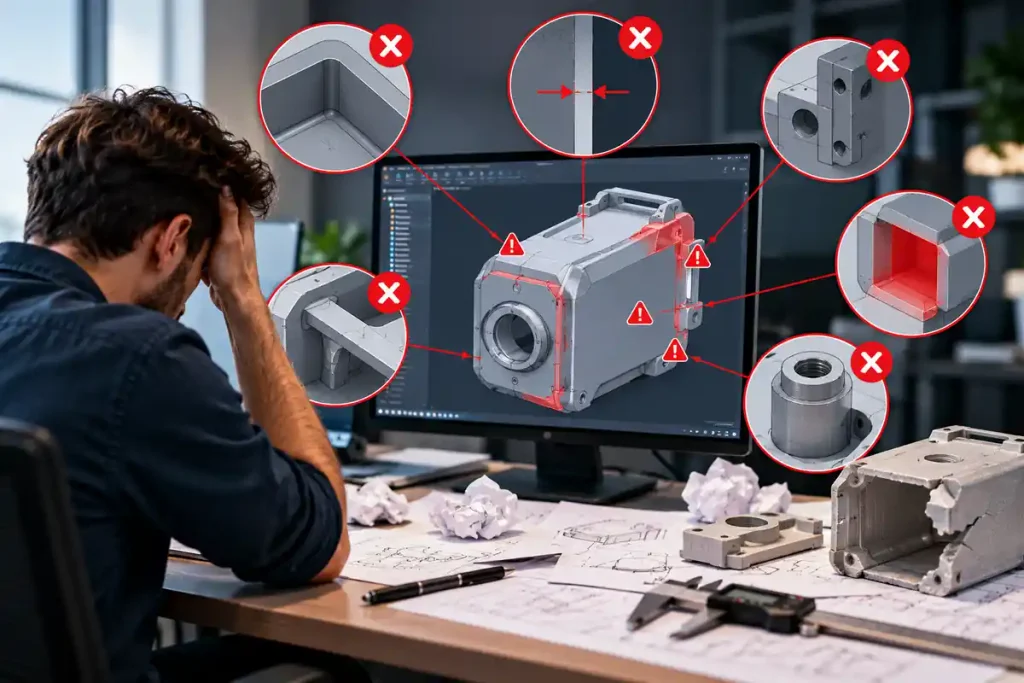
A CAD model may be seemingly complete but still cause issues in the manufacturing process. Here are five mistakes to avoid:
1. Mistaking visual design models for production-ready design models
The design model could be correct in visual terms, but lacks the dimensions, tolerances, and manufacturing information required to move into the manufacturing stage.
2. Not performing a DFM review
In the absence of a review of the design with regard to the manufacturing process, issues relating to materials, machining, forming, or assembly may arise at a point where correction would be very costly.
3. Forgetting about version control
The lack of clear identification of different versions could result in team members using the wrong designs. The revision control should be kept clear throughout the 3D CAD design process.
4. Setting incorrect tolerances
Tolerances that are too narrow could lead to increased manufacturing costs, whereas the wrong tolerances could create assembly issues.
5. Forgetting about the technical documentation
Despite a design being complete in its CAD form, additional documentation may still be required before moving to the manufacturing process.
How Shalin Designs Supports Your 3D CAD Workflow
Shalin Designs provides the extension of your design and engineering resources. 3D CAD modelling services allow for a high level of expertise without the overhead. We can work from initial conception to full 3D CAD model, or we can take over an existing design and modify, revise and complete technical drawings in a timely manner, on your software and to your standards.
This ensures that you can take care of the heavier workload requirements and project needs without having to immediately grow your existing staff. You have total control over the final approval processes, and Shalin Designs will provide the required support to get your projects from the conceptual stage to actual production.
Final Takeaway
In product development, a poorly developed CAD model can lead to design changes, manufacturing issues and unnecessary rework later in the project. A structured 3D CAD design process helps businesses identify these issues earlier and create clearer, production-ready information for the teams that need to use it.
If your in-house team needs additional capacity or you need accurate 3D CAD modelling services for a new product, existing design or manufacturing project, Shalin Designs can support your workflow. Contact us to discuss your CAD requirements and get the right support for your project.