

The distance between a finished design and a finished product can sometimes be surprisingly complex. A design which seems perfect on the computer can cause huge headaches at fabrication, machining or assembly. The trick is to make sure that the design contains the right information for the people and processes that will transform it into a real product. This is where CAD and CAM design can become valuable.
This article explores the journey from digital design to manufacturing, the role each technology plays, the checks that make designs production-ready, and how specialist mechanical CAD design & drafting services can help businesses avoid unnecessary revisions and production delays.
What Do CAD and CAM Mean for Modern Manufacturing?
CAD, which stands for computer-aided design, and CAM, which stands for computer-aided manufacturing, are two closely related processes in the digital manufacturing chain. Whereas the former deals with designing and documenting the product, the latter is used to plan and control the manufacturing process.
Therefore, having integrated and effective technical information, which CAD and CAM provide, is far more valuable to the company than having advanced software. In particular, when the design and engineering specifications are consistent and coordinated, it becomes easier to identify and respond to discrepancies, improve communication, and avoid unnecessary manufacturing steps.
How Does CAD Connect to CAM? The Workflow, Step by Step
The connection between CAD and CAM starts with the digital representation of a product or component and continues until that information is used to support manufacturing.
1. Concept and Design Development
Processes can start with a sketch, specification or existing drawing/product concept. This information can then be converted by CAD to an accurate 2D drawing or 3D model.
At this stage, designers are able to develop the dimensions, geometry, materials and component relationships of a design without immediately committing to manufacturing.
2. Design Review and Validation
Once the model has been developed, the design can be reviewed for possible issues.
Teams can assess dimensions, clearances, component fit, assembly relationships and manufacturing requirements before moving forward into production.
3. Manufacturing Preparation
The approved CAD information can then be prepared based on the intended manufacturing process. Depending on a project, this may include the production of detailed drawings, fabrication information, assembly documentation or geometry required for machining.
4. CAM Programming
CAM software will use the relevant design information to assist in defining the manufacturing operations.
For example, for a CNC machining process, this may include the development of toolpaths, machining strategies and instructions for the machine.
5. Production and Inspection
The manufacturing information is then used to produce the component or product. Once the product has been produced, the physical output can be inspected to ensure it meets the design requirements.
A connected path from digital design to physical production is created.
CAD vs CAM: What Is the Difference?
Although CAD and CAM work closely together, they serve different purposes within the manufacturing workflow.
| Aspect | CAD (Computer-Aided Design) | CAM (Computer-Aided Manufacturing) |
| Primary role | Creates and documents the product or component design | Converts design information into manufacturing processes |
| Main purpose | Define geometry, dimensions and design intent | Plan and support how the design will be manufactured |
| Typically used by | Designers, engineers and CAD drafters | CNC programmers, machinists and manufacturing teams |
| Key outputs | 2D technical drawings, along with 3D models and assemblies | Toolpaths, machining instructions and manufacturing operations |
| Main focus | Design accuracy, geometry, dimensions and specifications | Machining, fabrication and production requirements |
| Position in workflow | Design and engineering stage | Manufacturing preparation and production stage |
| Business value | Helps develop, review and refine designs before production | Helps translate approved designs into practical manufacturing operations |
Where Is CAD and CAM Design Used?
The application of CAD CAM design varies considerably depending on the industry, product and manufacturing method.
Product Design and Development
Computer-aided design enables businesses to develop products digitally, allowing them to make changes and refine details prior to heavy investment in prototyping or production.
Designers can also evaluate dimensions, components and assemblies for considerations during the evolution of the design.
Mechanical Engineering
Mechanical engineers can utilise computer-aided design to develop components, assemblies, and technical drawings which contain the information necessary for fabrication and manufacturing. This can include items such as brackets, machinery components, fixtures, housings, and mechanical assemblies.
Sheet Metal Manufacturing
Sheet metal design requires consideration of the material thickness, bends, cut-outs, holes, and fabrication requirements. Computer-aided design can be utilised to create detailed models and drawings which convey the necessary requirements to manufacturers.
Millwork and Custom Fabrication
Custom cabinetry, furniture and architectural millwork can require complex dimensions and considerations for a site-specific installation. Detailed drawings can be utilised to convey the sizes of components, joints, hardware locations and other assembly information ahead of time fabrication.
CNC Manufacturing
Computer-aided design models can provide the geometric information necessary for computer-aided manufacturing software to prepare CNC machining operations.
This allows manufacturers to transition from a digital component geometry into machine-ready production information.
Automotive and Industrial Equipment
Automotive components and industrial equipment can consist of multiple parts working together in larger assemblies. Computer-aided design can be utilised to organise these components, while computer-aided manufacturing can support the manufacturing operations needed to produce them.
Why Are CAD Files Important for Manufacturing?
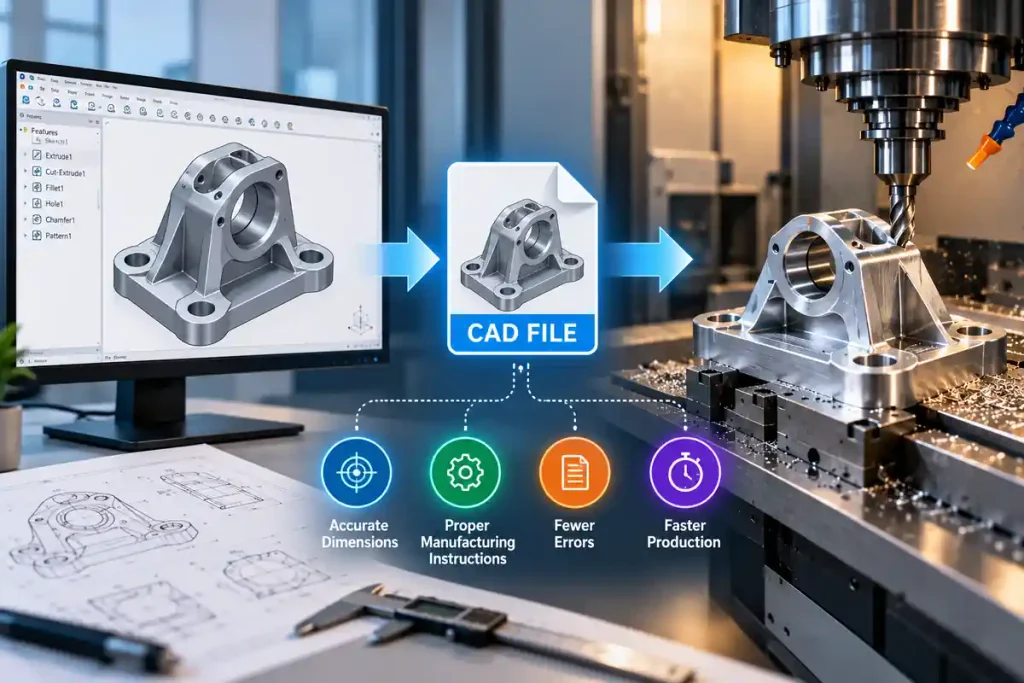
CAD files represent an important part of the modern manufacturing industry, being the standardised digital source of technical information. Rather than using sketches, separate measures or manually created drawings, different professionals and teams can rely on a single, cohesive source of data in the form of a CAD file.
1. They Reduce Interpretation Errors
Clear drawings and models reduce the ambiguity that can occur when manufacturing teams have to interpret incomplete sketches or manually processed information.Dimensions, geometry and other requirements can be specified accurately, providing a consistent source of reference for designers, engineers and manufacturers.
2. They Support Consistent Production
A properly prepared CAD file can be retained and reused if the same component needs to be manufactured again.
This is especially valuable for repeat production, allowing teams to work from an existing digital design rather than having to recreate the component from scratch.
3. They Help Shorten Design and Production Cycles
Digital designs can be reviewed and revised far more efficiently than conventional paper based documentation.
When a revision is required, engineers can update the relevant model or drawing and distribute the latest information to the manufacturing team, reducing unnecessary delays.
4. They Make Collaboration and Outsourcing Easier
Standardised CAD files allow information to be shared between internal teams, suppliers, manufacturers and specialist CAD partners.
With accurate, well organised documentation, external teams can understand the design requirements more easily whilst the business retains a reliable digital record of the project.
What Are the Benefits of Connecting CAD and CAM?
A stronger connection between design and manufacturing can improve more than just technical accuracy.
Businesses can benefit from:
- Early identification of design problems before physical production begins
- Fewer unnecessary revisions when manufacturing requirements are incorporated into the design development process
- Improved communication between designers, engineers, manufacturers and fabricators
- Improved production planning through more accurate technical information
- Greater consistency across drawings, models and manufacturing documentation
- Simplifies design revisions when digital information is properly organised and maintained
- Improved reuse of design data to support future projects, modifications or re-manufacture.
The result is a more organised workflow in which design information can move between teams with fewer gaps.
Common Mistakes Businesses Make With CAD and CAM
Problems on the shop floor often have their origins elsewhere, frequently far from the production line. The root cause of many problems is deficient design information, outdated records, and/or insufficient coordination among various personnel. Commonly occurring problems are, for example:
- Treating CAD drafting as an afterthought: Rushed or poorly done drawings can lead to incorrect dimensions, wasted machining time, materials and rework
- Not considering manufacturability: A design that looks great on the screen may have dimensions, tolerances, or detail that are challenging or impossible to machine.
- Not accounting for legacy drawings: Designers, engineers, and machinists should be able to rely on a drawing’s accuracy, even if it was created years ago.
- Working from different design iterations: When designers, CAM programmers, and manufacturers work from different design iterations, confusion and delays are inevitable.
These issues can often be avoided by establishing a clear CAD and CAM workflow, maintaining accurate digital documentation and ensuring that everyone involved in production works from the same approved design information.
How Shalin Designs Supports CAD and CAM Design Requirements
Shalin Designs caters to businesses that require accurate technical documentation to enable their concept and engineering requirements into production.
Some of its services include 2D CAD drafting, 3D product modelling, mechanical design, sheet metal design, manufacturing prototypes, millwork and shop drawings, fabrication cut-lists, assembly layouts and reverse engineering.
For mechanical projects, detailed CAD documentation can help provide dimensional information, relationships between components, and manufacturing requirements. For custom fabrication and millwork, drawings can provide the information required for cutting, assembly and installation.
The objective is simple: to produce accurate, usable design documentation which will give engineers, manufacturers, and fabricators the information they need to take the next step.
Ending Note
When a digital design reaches the manufacturing maturity of a tangible product there’s more to it than just the technical accuracy of the design model. The information within it must retain its level of clarity and be fit for purpose as it’s passed on to the manufacturing process.
This is the point where the relationship between CAD and CAM comes into its own. A good CAD model sets the design intent, but the CAM process takes this relevant information and turns it into actual manufacturability.
For businesses looking to make the most of their CAD and CAM design processes, technical expertise from a trusted and dependable partner can help to ensure that the transition is as smooth, controlled and efficient as possible.
Need support with your next engineering or manufacturing project? Get in touch with Shalin Designs to discuss your CAD design and drafting requirements.