

Products can look like they are ready for manufacturing but design issues can cause increased costs and delays once tooling has begun. By using CAD simulations, engineers can get a better idea of how their product will function in real life and identify any weak points within their design. Understanding when to use simulation during new product design can be beneficial to you as a business. This guide explains how simulation can support improved product design and how collaborating with an experienced CAD company can help make sure your product is ready for manufacturing.
Why Testing Before Production Isn’t Optional Anymore
These numbers illustrate how expensive mistakes can be. In the construction and manufacturing sectors, more than $500 billion is spent annually on rework resulting from poor project information and communication. 52% of this rework results from incorrect or incomplete data.
The Rule of Ten illustrates how expensive making changes can be. A design change costing you £1 at the concept stage could cost £10 at the detailed design stage and £100 during production. Although these figures will differ from project to project, it can help businesses steer clear of costly changes by spotting design issues early on.
What Is CAD Simulation?
CAD simulation involves using computer-based analysis to forecast how a digital product will perform under given conditions. This can be used by engineers within design to understand how something might behave under different conditions such as stress, heat, vibration, motion and fluid dynamics.
For example, if you owned a start-up that makes a wall-mounted bracket, you could use Structural Simulation to observe how the component would perform under anticipated loading conditions and pinpoint where the high stress points occur. This enables engineers to understand which modifications they could make to their design.
CAD simulation frequently relies on computer-aided engineering (CAE) tools, whether built into CAD software or provided by dedicated analysis programs.
Why Is Simulation Used in CAD?
CAD simulation primarily allows you to identify any issues with performance at a point where it is still relatively easy to make changes to the design.
When a design decision is made, it is usually less costly to change than it would have been if the design had already affected tooling, material purchases and finished parts. This means engineers have another option to explore during simulation.
It includes:
- Design Weakness Recognition: Pinpoint locations where there might be high levels of strain, deflection, or temperature.
- Design Alternative Comparisons: Assess different forms, dimensions, materials, or supports under identical conditions.
- Avoiding Unnecessary Re-work: Anticipate any problems before getting into production.
- Assisting Materials Selection: Consider whether the material or component design is suitable for the job at hand.
- Engineering Evidence for Design Assurance: Apply engineering facts together with calculations, design evaluations, and physical tests.
- Improved Prototyping Decisions: Use simulation results to help choose which designs will undergo physical testing.
Engineering simulation can also help teams investigate several design options before choosing which one to develop further. Autodesk explains how digital analysis supports performance evaluation and design refinement before physical testing.
At What Point Should a Design Be Tested Before Production?
When using CAD simulation in engineering CAD design, consider the product’s complexity, operating conditions and potential cost of failure. Carrying out tests at crucial phases allows engineers to spot design problems early, improve performance, and prevent expensive modifications after production starts.
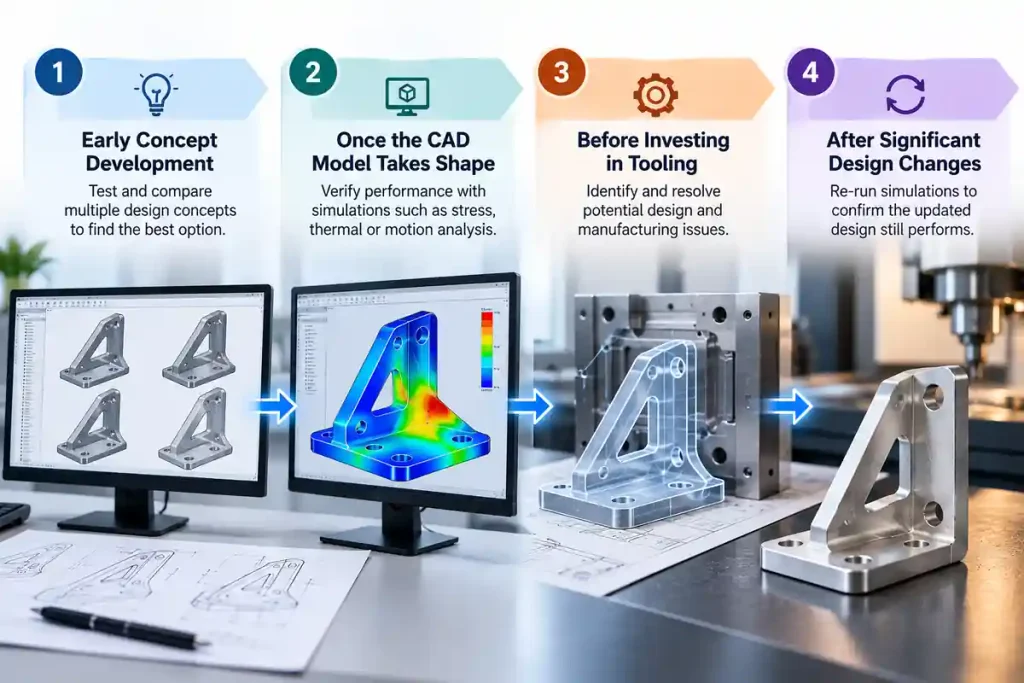
1. During Early Concept Development
Simulation will help you determine which design concepts are worth pursuing at an early stage. For instance, if your start-up is designing a light support frame, you can simulate various materials, shapes and support configurations to see which designs look promising.
2. Once the CAD Model Takes Shape
After the design’s basic geometry has been set, you can start verifying that the design satisfies your functional requirements. As an example, thermal analysis can be employed to check for overheating issues inside the equipment housing.
3. Before Investing in Tooling
For products involving expensive moulds or specialist components, simulation can help assess potential design and manufacturing issues before production commitments are made.
4. After Significant Design Changes
Material changes, dimensional changes, loading changes, or changes in arrangement of components may impact performance. Engineers need to check their previous simulation results and repeat tests if necessary.
Types of CAD Simulation and What They Reveal
CAD simulation is not a single tool. It is a class of analyses, each intended to evaluate a particular facet of performance. Here are the most common types.
Structural Analysis (FEA)
Finite Element Analysis will assist you in understanding how your design reacts to physical forces, identifying areas of stress, deformation and potential failure. Use when your product will be subject to load, pressure or cyclic stress.
What it reveals: Weak points, safety factors, and areas where material can be removed without compromising strength.
Thermal Analysis
Thermal tests evaluate how your design will behave under various thermal conditions. This can help you to understand where heat is being dissipated, and any potential problems with hotspots. This should be used if your product will produce heat, work in high temperatures or need to dissipate heat effectively.
What it reveals: Hot spots, cooling requirements, and material suitability for high-temperature applications.
Fluid Flow Analysis (CFD)
Computational Fluid Dynamics (CFD) tests how fluids (liquids or gases) interact with your design. It reveals flow patterns, pressure drops, and turbulence. Apply it when your product includes airflow, liquid flow, or cooling systems.
What it reveals: Flow efficiency, pressure losses, and design modifications that enhance performance.
Vibration and Modal Analysis
Vibration analysis is used to investigate the response of a design to dynamic loading. It provides information on natural frequencies, potential resonances and fatigue life. This should be carried out if your product will experience vibration or needs to withstand shocks.
What it reveals: Resonance points, fatigue hotspots, and design changes that improve durability.
Drop and Impact Analysis
Drop analysis simulates what happens when a product is dropped or struck. It reveals deformation, stress, and potential failure. Use it when your product is portable, shipped frequently, or subject to rough handling.
What it reveals: Impact resistance, energy absorption, and design changes that prevent breakage.
How to Decide Whether Your Design Needs CAD Simulation
Before investing in simulation, assess the risks and uncertainties surrounding the design.
Ask these questions:
- Will it cause issues with safety or cause major damage? Products that are safety critical or will be under high stress may require advanced analysis.
- Will it be challenging to recreate the operating conditions? Performing analysis can aid understanding of situations that would be costly or unfeasible to test multiple times.
- Will it be costly to make any changes to the design once it is in production? Advanced analysis can be useful when tooling, specialist materials and large quantities are required.
- Is there complex interaction within the product? Analysis may be required for moving parts, thermal transfer, fluid flow and complex assemblies.
- Is there enough quality data available to perform meaningful analysis? Material properties, loads, boundary conditions and operating criteria will all affect the outcome.
If the product is a simple, low-risk component with well-understood performance, a full simulation may add little value. Standard calculations, design reviews and basic prototype checks may be sufficient.
What Information Is Needed Before Running a Simulation?
A simulation is only as useful as the model and assumptions behind it. A detailed 3D drawing alone is not enough to establish how a product will behave.
Before starting, the team should define:
- Geometry Design – Suitable CAD design including the necessary features and interfaces.
- Material Properties – Properties of the material to be used.
- Loading & Constraints – Forces, supports, pressure or other conditions that can be applied to the product.
- Environmental Conditions – Any temperatures, motion, fluids or other conditions to be considered.
- Performance Requirements – Any limits or requirements that will be used to evaluate results.
- Analysis Requirements – What question needs to be answered and how accurately it needs to be answered.
Engineers must also review the results critically. Unexpected outputs may point to a design problem, an incorrect assumption or a modelling issue.
What CAD Simulation Can Validate and What It Cannot
Simulation through CAD allows engineers to determine the performance of their design prior to manufacture, although this process relies on the precision of the model and inputs used. Knowing how to use CAD effectively enables teams to determine when further evaluation is required.
| What simulation can test | What simulation can’t fully predict |
| Structural strength under different loads | Variations in real-world material properties |
| Fatigue life under repeated loading | Actual wear and surface finish over time |
| Thermal performance and heat dissipation | Every real-world operating condition |
| Fluid flow, pressure drops and drag | Behaviour beyond the model’s assumptions |
| Assembly interference and motion clearance | All manufacturing defects and tolerance variations |
| Vibration modes and resonance | Actual performance without suitable validation |
| Mould filling and cooling behaviour | Every variation in the manufacturing process |
| Opportunities to reduce weight through topology optimisation | Practical usability and human interaction |
How Shalin Designs Supports Product Design Projects
Shalin Designs helps businesses turn product concepts into accurate, production-ready technical documentation. Its product design services include 2D CAD drafting and 3D product modelling, helping teams develop clear digital models and drawings for engineering and manufacturing. It also provides reverse engineering services that convert manual drawings into digital format.
This enables start-ups, designers and manufacturers to better manage their design data, communicate technical requirements and get their product ready for the next stage of development. If CAD simulations are required then the analysis and validation requirements should also be defined.
Final Takeaway
CAD simulation can help you detect any potential issues with your design before they become expensive manufacturing issues. It allows you to create prototypes at key design stages to make comparisons between different design options, improve performance of your products and help you to make better decisions. Simulation should be supported with accurate CAD models, trusted engineering data and physical verification when required.
By having an efficient product design process with the right technical knowledge, both start-ups and manufacturing companies can feel more confident throughout the design to production process. Knowing what to test at an early stage can save time and ensure less unnecessary rework.
Planning your next product development project? Contact Shalin Designs to discuss your CAD design and drafting requirements.