

A manufacturing issue may arise, long before the machine starts cutting material. According to NIST, US manufacturers spend an estimated $8.4 billion on engineers answering questions and creating additional drawing documentation, while interoperability issues across different data formats can cost another $20.9 billion to $42.9 billion.
This highlights a fundamental challenge in modern CAD manufacturing: design data needs to move accurately from concept to production without being repeatedly recreated, interpreted or corrected. So, what is CAD & CAM design, and how does it help bridge the gap between digital design and physical manufacturing? This guide explains how CAD and CAM work together, where they fit into the manufacturing workflow, and why a connected digital process matters for businesses working with an experienced CAD company.
What Is CAD/CAM Design?
CAD/CAM design involves the integration of computer aided design (CAD) and computer aided manufacturing (CAM) to convert a computer design into a manufactured product. While CAD deals with the creation of a three-dimensional model of the product, CAM focuses on utilizing the data generated in CAD to develop processes to manufacture the design.
For example, while a CAD software may be used to design an aluminium machine part, CAM data would be used to determine how best the material can be machined into the required shape. In other words, CAD defines the design to be manufactured, while CAM determines how manufacturing processes such as CNC machining can be utilized to meet design specifications.
Why Is CAD/CAM Important in Modern Manufacturing?
Manufacturing becomes more complex when a design goes through several people, software and production stages. A small inconsistency in dimensions, geometry or manufacturing information can cause problems much later in the process.
CAD/CAM helps create a much more connected digital workflow by allowing design information to pass from engineering into manufacturing with less manual interpretation.
For businesses, this can mean much better control over design revisions, much more consistent production information and fewer avoidable issues between design and manufacturing teams.
What Is CAD in the Manufacturing Workflow?
Computer Aided Design (CAD) is a process that supports the development of computerized representations of products, components, assemblies and structures.
CAD can be used to develop both 2D technical drawings and 3D models, depending on the project requirements. These digital designs can contain dimensions, tolerances, materials, annotations and other information needed to communicate design intent.
What Does CAD Actually Do?
CAD supports several important stages of product development:
- Creates accurate geometry: Designers and engineers can design complex shapes and sizes of components digitally.
- Documents design information: Technical drawings can document the necessary dimensions, materials, tolerances, and other details.
- Supports design changes: Computer-aided design allows designers to make modifications to drawings without having to redo the entire design process.
- Enables design review: Technical drawings help teams review and analyze components before they are manufactured.
- Creates manufacturing data: The information included in cad drawings services can be used to manufacture components that meet the specifications of the design.
The value of CAD is therefore not limited to producing attractive 3D models. It creates a structured digital representation that can support engineering, review, documentation and manufacturing.
What Is CAM in the Manufacturing Workflow?
Computer Aided Manufacturing, or CAM, deals with using computer aided design information to plan manufacturing processes. The software can analyze appropriate CAD geometry and assist manufacturing teams in executing operations such as cutting, drilling, milling and other machining processes.
The systems can generate tool paths and machining instructions that can be used by compatible machinery to carry out the manufacturing process. This means that CAM can be used to bridge the gap between computer aided design specifications and the manufacturing process itself.
How Does the CAD/CAM Workflow Work?
The complete workflow can vary depending on the product, manufacturing method and software involved. However, a typical process follows several connected stages.
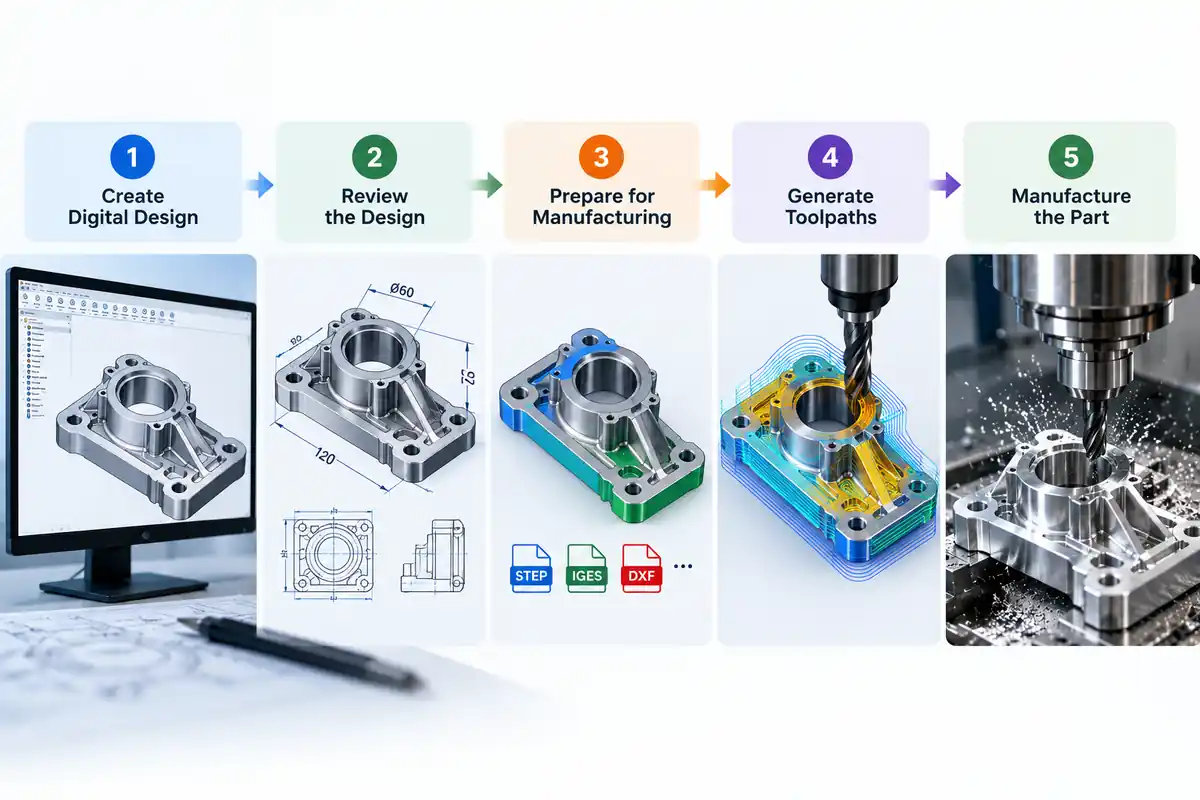
Step 1: The Creation of the Digital Design
Either from a concept, specification, sketch or an exiting component, designers or engineers create the required geometry using CAD software. It is at this point that dimensions, features, materials and other design requirements are specified.
Step 2: The Review of the Design
Before any manufacturing takes place, the design needs to be reviewed to ensure that it meets its intended application and manufacturing process. This may include a review of the components dimensions, tolerances, clearances, material specifications and manufacturability. At this stage problems are generally easier to resolve than waiting until manufacturing commences.
Step 3: Prepares the Design for Manufacturing
With the design complete and approved, the relevant information is then exported or imported into the CAM environment. Depending on the software being used and the manufacturing process, this information may be exported as STEP, IGES, DXF or other CAD specific formats. The CAM programmer then prepares the required information for the designated manufacturing process.
Step 4: The Development of Manufacturing Operations
The CAM process will dictate how the machine will approach the component. This may involve the selection of tools, cutting paths, machining sequences and manufacturing parameters amongst other things. Essentially the manufacturing instructions are developed that will enable the manufacturing equipment to replicate the design.
Step 5: The Manufacture of the Component
With the manufacturing instructions ready, these are then uploaded into the appropriate machine or production process. When using the CNC machining process for instance, the machine will automatically manufacture the component according to the tool paths defined.
Step 6: Inspection and Improvements
The manufactured component can then be inspected against the original design specification. Where there are inconsistencies, the information can then be reviewed and changes made to the process or design. This forms a feedback loop that feeds into the design and manufacturing processes.
CAD vs CAM: What Is the Difference?
CAD and CAM work closely together, but they serve different purposes within the manufacturing workflow.
| Aspect | CAD | CAM |
| Full form | Computer Aided Design | Computer Aided Manufacturing |
| Primary purpose | Creates and documents the digital design | Plans how the design will be manufactured |
| Main focus | Geometry, dimensions and design intent | Manufacturing operations and machine processes |
| Typical users | Designers, engineers and CAD drafters | CAM programmers, machinists and manufacturing teams |
| Common outputs | 2D drawings, 3D models and assemblies | Toolpaths, machining operations and machine instructions |
| Workflow position | Design and engineering | Manufacturing preparation and production |
| Business value | Helps develop and communicate an accurate product design | Helps translate the approved design into manufacturing operations |
The two technologies are not competing alternatives. They are complementary parts of the same digital manufacturing workflow.
Where Is CAD/CAM Design Used?
CAD/CAM design may be applied in all areas where a product, which must be manufactured repeatedly, has to be represented precisely by a digital model to facilitate its practical creation. This technology helps companies ensure that the engineering process addresses various design aspects, which would otherwise require iterations to reconcile with production specifications.
Automotive and Transportation
Automotive manufacturers make extensive use of CAD/CAM in the design and machining of many different types of components, including brackets, housings, engine parts and tooling. The CAD models define the component and CAM translates the approved geometry into machining instructions for CNC equipment. Explore these CAD design examples to understand how businesses use CAD in different applications.
Aerospace and Engineering
Aerospace components typically require a very high degree of control over dimensions and often utilise highly controlled manufacturing processes. CAD/CAM provides support in the creation of complex parts, tooling and assemblies, and enables consistency between the approved design and manufacturer process.
Industrial and Machinery Manufacturing
For machinery and industrial equipment CAD/CAM is often used to create customised components, machine parts, fixtures and assemblies. The connected workflow ensures manufacturers can move from engineering drawings or 3D models to production with reduced opportunity for interpretation errors.
Consumer Products
Product manufacturers use CAD/CAM to design and develop a wide range of products including electronic enclosures, appliances, furniture components and specialist equipment. Digital models can be refined and validated prior to CAM preparing the information required for manufacturing.
Prototyping and Custom Manufacturing
CAD/CAM is especially valuable in situations where prototypes or customised components are required. A digital model can be rapidly modified, tested and then utilised for the preparation of manufacturing instructions without redevelopment from scratch.
When Should a Business Consider Professional CAD Design Support?
Not all businesses will need a large in-house CAD team. To meet the increasing technical complexity of projects or rising production demands, specialist CAD support can provide extra resources and skills.
Professional CAD support can be particularly useful when:
- A project requires detailed mechanical drawings or 3D modelling.
- Internal teams have limited CAD capacity.
- Existing sketches or paper drawings need to be converted into accurate digital files.
- Manufacturing requires detailed production documentation.
- Multiple design revisions need to be managed efficiently.
- A business needs additional technical drafting support without expanding its permanent team.
- Engineering teams need to focus on design decisions while specialist drafters manage detailed documentation.
The right approach depends on project complexity, internal capabilities and production requirements.
How Shalin Designs Supports CAD/CAM Requirements
Shalin Designs offers engineering and product design services to meet the requirements of businesses seeking to convert concepts, sketches and engineering requirements into accurate technical documentation and production ready digital assets.
The mechanical CAD design & drafting services offered address the requirement of organizations which need detailed mechanical drawings, 3D models and accurate engineering documentation for manufacturing and other downstream applications.
Using a combination of technical drafting expertise and an understanding of manufacturing requirements, the focus is on creating digital design information that is clear, structured and practical to use.
Final Takeaway
CAD/CAM is not a replacement for manual drafting or a means to automate machining processes, but rather, it provides an enhanced link between the design and manufacturing processes.
CAD identifies the product, while CAM focuses on manufacturing processes and converting the designed product into a manufactured good. Thus, CAD/CAM processes enable faster production, less interpretation of the design documentation, fewer changes to the design, and overall, a well-documented process of turning a digital model into an actual product.
The right approach depends on your product, production process and documentation requirements. If your business needs specialist drafting support, additional project capacity or accurate technical drawings, contact us to discuss how we can support your next project.