

Moving a CAD file between designers, software programs and production teams is not always as simple as it sounds. The difference in file formats can have an impact on how the drawing information is opened, edited and shared, and can cause compatibility issues or extra work in some cases. This is particularly important in instances where architects, engineers and manufacturers are sharing design files as a part of the same project.
A DXF drawing is primarily used to exchange CAD data between different applications while DWG is common as the working CAD format for AutoCAD-based workflows. Both formats allow storing vital information about the original drawings but they are intended for different stages of the production process.
The choice between DXF and DWG depends on how the drawing will be used, which software needs to open it, and what information must be retained. For projects involving multiple file formats, CAD conversion services can help prepare drawings for use across different software platforms and downstream workflows.
What Is a DXF Drawing?
DXF stands for Drawing Exchange Format. Autodesk created the format to simplify the exchange of information about drawings between AutoCAD and other CAD systems. A DXF file contains information that describes a drawing, including geometric information, dimensions and text, and can be accessed and manipulated by another compatible application.
A .dxf file should therefore be regarded as an exchange format rather than simply another version of a DWG file.
DXF files can be created from CAD applications such as AutoCAD and imported into other software. They are available in ASCII and binary forms, although ASCII DXF is the more commonly referenced format and uses structured text to represent drawing information.
For a designer, the practical benefit is simple: DXF can make it easier to move selected CAD information between different software environments.
What Is the Role of DXF Files?
DXF files become particularly useful when a project involves multiple software platforms or when a recipient needs CAD geometry without requiring the original authoring environment.
Common roles include:
- CAD data exchange: Transfer drawing geometry between different CAD applications without requiring the same authoring software.
- Supplier and manufacturer coordination: Share profiles, layouts and other geometry with fabricators, manufacturers or external design teams.
- CNC and cutting workflows: Provide 2D geometry for CNC routing, laser cutting, plasma cutting and other manufacturing processes that support DXF.
- 2D drawing transfer: Move plans, profiles, outlines and other 2D design information between systems for editing or downstream use.
- Legacy software support: Exchange CAD information with older or specialist applications that support DXF but can not accept newer or proprietary file formats.
- Design collaboration: Give project partners access to the required geometry without necessarily sharing the complete native CAD working file.
- CAD conversion workflows: Convert drawings from one supported format into DXF when a supplier, machine or downstream application requires it.
Which Files Can Be Converted to DXF?
DXF files are frequently created as output or exchange formats from CAD software. Depending on the application and the type of data contained in the source document, designers often convert or export:
- DWG drawings
- AutoCAD drawings
- 2D CAD layouts
- Selected 3D CAD geometry
- Architectural and engineering drawings
- Profiles and production geometry
- Drawings from other compatible CAD platforms
However, conversion should be approached with caution. The quality of the resulting DXF depends on the source drawing, selected export settings and the capabilities of the receiving software.
Before sending a converted file, check the geometry, scale, units, layers, dimensions and other information that the recipient actually needs.
How Is DXF Drawings Different From DWG Drawings?
This is the major difference between DWG and DXF.
DWG is the native format for drawings for AutoCAD software products. DXF was created to transfer drawings between other CAD software.
| Feature | DXF | DWG |
| Primary purpose | CAD data exchange | Native CAD drawing and project work |
| File structure | Commonly text-based ASCII, with binary DXF also available | Binary drawing format |
| Cross-platform exchange | Strong advantage | Depends on receiving software |
| File size | Often larger | Generally more compact |
| AutoCAD | Can be imported/exported | Native AutoCAD drawing format |
| Drawing information | Can contain substantial drawing data, but compatibility varies | Can retain a broader range of CAD data and relationships |
| Best suited for | Sharing and exchanging CAD information | Working, editing and maintaining the main drawing |
Autodesk notes that DWG can retain information such as layers, colours, line weights and external references, while DXF retains a more limited representation depending on what is exported. DXF files can also be substantially larger because ASCII DXF stores drawing information as text.
For a deeper explanation of common CAD formats, read CAD File Formats Explained: What Designers and Manufacturers Need to Know.
What Should Designers Know Before Choosing DXF?
The choice of DXF format does not depend solely on the compatibility of the program with the file itself. The designer must also consider the further use of the drawing and the ability of the other system to understand the data.
Before choosing DXF, check:
- Receiving software: Confirm that the client, supplier, manufacturer or production system is able to receive the required DXF version.
- Drawing requirements: Determine if the recipient needs basic geometry or additional geometry with dimensions, text, layers and blocks.
- 2D or 3D requirements: DXF is typically used for 2D CAD data, with 3D support varying depending on the software and type of entities transferred.
- Units and scale: Confirm that the units, scale and other general drawing settings are not changed during export. A file that opens correctly can still have incorrect measurements.
- Layers and organisation: Ensure that layers, line types and other drawing information are retained if they are needed for editing or production.
- External references: Check if the drawing contains external references, linked files or other information that may not transfer with the DXF.
- Post-conversion review: Open the exported file in the receiving software, and check geometry, dimensions, text and other key elements before sending the file into production.
Which File Format Should You Choose?
The right choice depends entirely on what happens to the file next.
- Choose DXF when sending 2D profiles to CNC or laser cutting machines, exchanging drawings with programs not related to the Autodesk suite, or scanning paper drawings from the past.
- Choose DWG when the drawing needs to stay fully editable within an ongoing AutoCAD-based workflow, or when preserving complete drawing data matters more than cross-platform compatibility.
Pros and Cons of DXF Files
DXF can be a practical format for sharing CAD information across different software and production workflows, but it also has some limitations. Understanding both sides can help designers decide when DXF is the right choice for a project.
Advantages of DXF
- Good interoperability: DXF was specifically created for CAD data exchange
- Useful in different software: It can sometimes be easier to import into applications that natively do not support DWG
- Suitable for many 2D workflows: Profiles, layouts and other geometry can be effectively transferred if the receiving system supports the necessary entities
- Useful for production workflows: Some downstream systems and equipment accept DXF directly
- Readable structure: ASCII DXF stores information as structured text, which can be useful for some technical workflows
Limitations of DXF
- Larger files: ASCII DXF files can be much larger than the original DWG.
- Potential information loss: Not every CAD object or relationship transfers perfectly between applications.
- Export settings matter: Poorly configured exports can affect layers, units, geometry or other drawing information.
- Less suitable as a master file: For many AutoCAD workflows, DWG remains the better format for maintaining the primary working drawing.
The key point is that DXF solves a data exchange problem. It should not automatically replace the main working file.
Common Use Cases for DXF Files
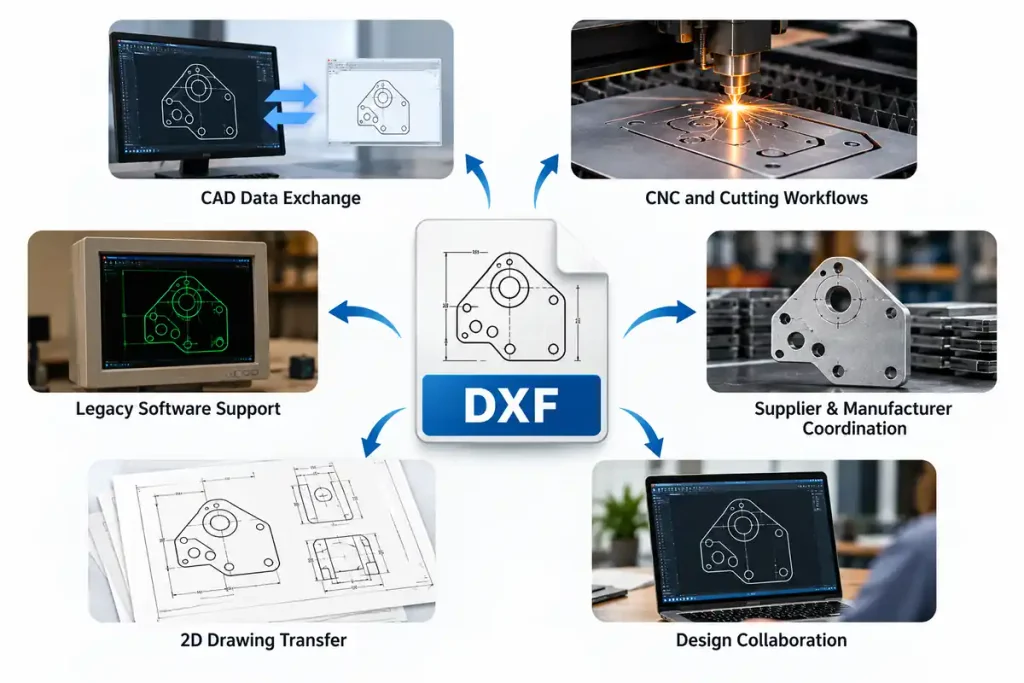
DXF provides a practical way to exchange CAD information between different software environments, particularly when 2D geometry needs to move into the next stage of a project. This makes it useful across manufacturing, engineering and product development workflows, where teams work with a top CAD development company to connect design data with wider technical systems.
CNC and Manufacturing
DXF files can be used to transfer profiles, outlines and other 2D geometry into CNC and manufacturing workflows. Before production, the receiving system should be checked for compatibility and the drawing should be reviewed for correct dimensions, units and geometry.
Architectural and Engineering Coordination
When project teams are using different CAD platforms, DXF provides a practical way of exchanging selected drawing information between them. Architectural and engineering professionals plus external drafting teams can share required geometric information without each party having to work within a common software environment.
Laser and Plasma Cutting
DXF is ideal for many 2D profile cutting applications such as laser or plasma cutting machines. The file should be checked for scale, closed geometry, units and any unwanted elements removed before sending to the production machine.
Furniture and Millwork
In furniture, cabinetry and architectural millwork projects, DXF can help transfer selected profiles and production geometry between design and fabrication workflows. This can be useful when drawings move from a design team to a manufacturer or CNC operator using different software.
CAD Conversion and File Preparation
DXF is also useful when businesses need to move existing drawings into a different CAD environment. A drawing may need more than a simple format change; geometry, layers, dimensions, units and other information may need to be checked or cleaned before the file is used.
Ending Note
It is common that CAD files go through multiple stages before they are ready for production. For this reason, it is important to use a certain file format that would allow avoiding inconsistencies and additional editing. In this regard, DXF is recommended for exchanging drawing data between different programs, while DWG is more appropriate for maintaining the master CAD file. These conventions should be implemented on both individual and team levels to ensure that drawings are up-to-date at all times.
If your in-house team needs additional drafting capacity or you need CAD conversion services for an existing drawing, software migration or manufacturing workflow, Shalin Designs can support your project. Contact us to discuss your requirements and get the right support for your workflow.