

Ask any architect, and they will have strong opinions and preferences when it comes to choosing between AutoCAD vs Revit, or probably both. When it comes to designing and detailing bespoke cabinetry and woodworking projects, precision is necessary.
Every millimeter counts, every joint matters, and every cut reflects craftsmanship. For professionals in architectural millwork design and drafting services, AutoCAD and Revit have long been the trusted pillars of digital drafting and modelling.
However, the question that gets attention and discussion across workshops and studios is: Which is better, Revit or AutoCAD, for cabinetry and woodworking?
In this blog, we will address this question and also highlight the distinctiveness of Revit and AutoCAD, which will help you make further decisions.
Understanding the Core Differences
To compare AutoCAD vs Revit, it’s essential to understand how these two differ from design perspectives.
What is AutoCAD?
AutoCAD is primarily a 2D drafting and 3D modelling services tool that allows complete manual control over line work, geometry, and annotation.
What is Revit?
Revit operates on a Building Information Modelling (BIM) platform.
| Features | AutoCAD | Revit |
| Primary Focus | Geometry-based designs | Data-driven designs |
| Workflow | Architects create and update every 2D/3D model view separately | Works on automation, such as updating a single model, updates all plans and sections. |
| Ideal Use | Drafting mechanical parts, product design, floor layouts, or fabrication details. | Designing and managing architectural, structural, and MEP systems within one integrated model. |
| Data Integration | Limited. | Extensive data integration, as every component has parameters- materials, cost, performance, etc. |
| File Collaboration | Individual files | Multi-user shared models |
| Visualisation | Strong in 2D. 3D rendering requires external software | Built-in rendering, walkthroughs, and realistic material visualisation. |
| Drafting Style | Users define all the layers and dimensions manually. | Smart modeling: changes are reflected automatically in dimensions, tags, and schedules. |
What is Better for Cabinetry Projects- AutoCAD or Revit?
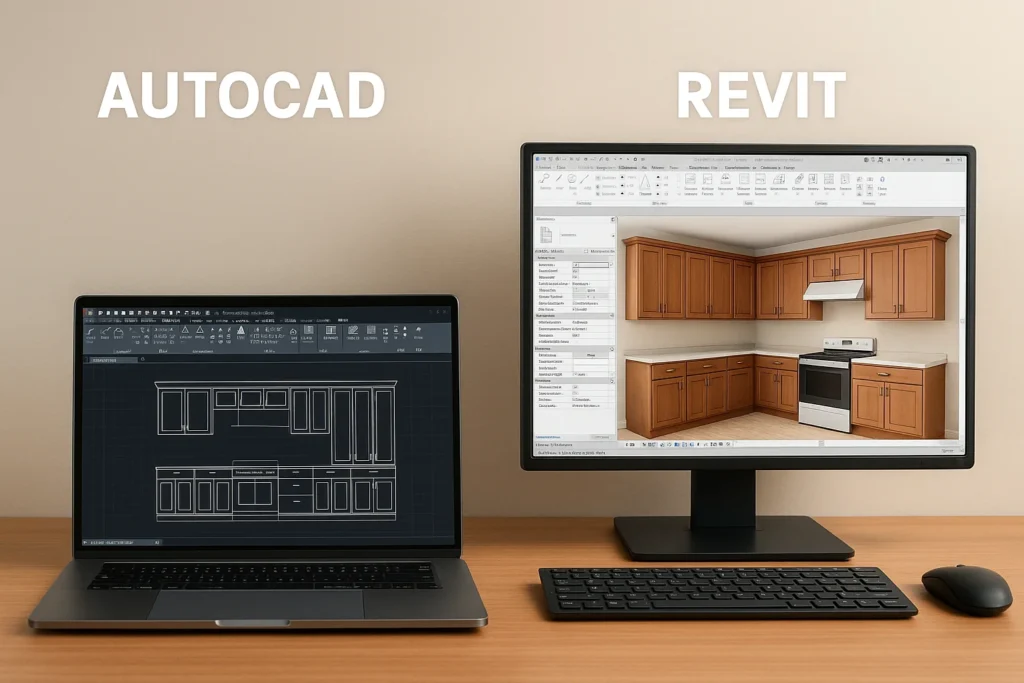
The craftsmen in this industry understand that every project has unique requirements, so they offer bespoke cabinetry CAD design. There would be clients preferring that specific “traditional look from joinery”, whereas some would appreciate the trendy vibe of the cabinets.
In such cases, AutoCAD for woodworking is still a top choice for designers and engineers who want complete control and accuracy. It helps create 2D plans, elevations, and sections with exact measurements for clear manufacturing drawings. Every groove, tenon, and dovetail can be drawn and detailed by hand with precision.
Revit for cabinetry design, however, brings the advantage of intelligent modelling, making every cabinet element easier to design, edit, and document. Instead of drawing each panel manually, designers create parametric families- predefined models that automatically adapt to size, finish, or material changes. This becomes a major time-saver for large-scale or repetitive joinery works such as hotels, kitchens, and retail interiors.
Read More: 3D CAD for Custom Cabinetry: Benefits and Workflow
Today, many design workshops prefer a hybrid workflow model, where they use both AutoCAD and Revit within their projects. Each of these software has a specific role to play, and together they create a more efficient process- from concept to completion.
The entire game here is about pure context and requirements, specifically when it comes to AutoCAD or Revit. During the deployment phase, both software components complement each other.
Revit vs AutoCAD- Which One Shapes Furniture Better?
From cutting and shaping to finishing and creating a beautiful product, each stage of a woodworking project requires the right tool for the specific task. Knowing which software tool to use keeps your workflow process smooth while preserving your vision.
Therefore, whenever you face a dilemma in Revit vs AutoCAD for furniture design services, the difference stands out most clearly when projects demand both precision and decorative detailing.
When it comes to visualization, Revit for cabinetry design brings a crystal-clear advantage. Its 3D capabilities let designers showcase the final product within interior environments. Finishes, materials, and hardware can be rendered realistically for client approval and review.
Not Sure Which Software Fits Your Project Best?
Whether AutoCAD or Revit suits your woodworking needs, our experts can guide you and deliver the right drafting solution for your unique designs.
What is Required in Millwork Detailing?
One of the most powerful aspects of custom millwork drafting services with Revit is parametric control. Designers can design flexible cabinetry libraries that adjust themselves to varying sizes, materials, or finishes. This brings consistency across large-scale projects without limiting creativity.
Also, you can use AutoCAD and Revit for millwork requirements due to their exceptional features.
- AutoCAD excels in detailed 2D work, which is vital for CNC machining and achieving handcrafted accuracy.
- Revit offers model intelligence and automation for larger workflows.
The increasing demand for bespoke cabinetry CAD design in the UK and global markets has driven this hybrid approach. Revit ensures speed and coordination, while AutoCAD maintains the precision and traditional control that woodworking artisans respect.
Read More: The Role of Millwork Drawings in Cabinet Design
When to Choose These Software Tools?
AutoCAD
- When your project requirements are related to 2D drafting, detailing, and technical documentation.
- When you want to work out on lines, layouts, and geometric designs with precision.
- It is ideally suitable for custom furniture pieces, joinery, and millwork drawings.
- When you want to have total ownership of the geometric designs for 2D and 3D models without incurring additional expenses.
Revit
- When your woodworking projects involve complex assemblies or large-scale installations.
- Ideal for parametric and intelligent modelling of cabinetry or custom millwork.
- Ideal for projects that require BIM integration and the sharing of project data.
- Suitable when you need automatic updates across multiple views or sheets.
What Do the Market Findings Tell You?
According to the reports from Markets and Markets, the global BIM (Building Information Modelling) market is projected to rise from US$9.03 billion in 2025 to US$15.42 billion by 2030. This growth rate is influenced by several factors that include-
- Rapid urbanisation
- Digital twin technology
- Sustainability
- Collaborative design process.
As the industry expands, AutoCAD continues to play a crucial role in precision drafting and detailing. It provides exceptional control over joinery layouts, section drawings, and manufacturing documentation. This makes it indispensable for furniture designers and millworkers who rely on technical accuracy.
For all those who adopt the BIM workflow system, Revit remains a widely used and highly recommended tool. Together, AutoCAD and Revit enable designers to deliver projects that are aligned with vision and look visually refined.
Final Words
If your focus is on individual furniture pieces, detailed joinery, or traditional millwork, AutoCAD remains the best tool for achieving accuracy and control.
However, for large projects requiring multiple cabinets, coordinated drawings, and rapid revisions, Revit for cabinetry design offers undeniable efficiency. Its parametric and BIM-driven environment enables automation, reducing time spent on repetitive tasks.
At Shalin Designs, our experts use both Revit and AutoCAD to deliver world-class woodworking and cabinetry solutions. Whether it’s custom millwork drafting with Revit or precision AutoCAD for woodworking, Contact Us and discuss your requirements with our experts today.